
Checkout Options for Hyvä Stores: Hyvä Checkout vs React Checkout vs Luma Fallback (2026)
04.04.2026
Four Magento checkout options for Hyvä Theme stores compared: Hyvä Checkout, React Checkout, Luma fallback, and third-party extensions. Cost, speed, PSP support, and which to pick.
Switching to Hyvä Theme gives speed boost to your webshop. But the checkout page is where revenue is won or lost, and choosing the wrong checkout solution can undo every performance gain Hyvä delivers on the rest of your site.
TL;DR: Hyvä stores have four checkout paths. Hyvä Checkout (€1,000 commercial license) is the fastest route to higher conversions — merchants report 28–67% increases. Hyvä React Checkout (free, open-source) gives full control but demands React expertise and significant custom development. The native Luma checkout and third-party one-step extensions work via a fallback module but load the full Luma JavaScript stack on the checkout page, erasing Hyvä's speed advantage where it matters most. Below, we break down all four options with real numbers so you can decide which fits your store.
Why Magento Checkout Deserves Its Own Strategy
Checkout is the most expensive page on your site and not in hosting or development costs, but in lost revenue. According to Baymard Institute research, the average online cart abandonment rate hovers around 70%. Nearly a fifth of those abandonments trace back to a checkout process that is too long or too complicated.
The standard Magento 2 checkout (built on the Luma/Blank theme) compounds this problem with its technical architecture. It relies on Knockout.js, RequireJS, jQuery, and a cascade of JavaScript dependencies that inflate page weight and slow down rendering, especially on mobile. Customising it is painstaking work, which means improvements move slowly and cost more.
When you run Hyvä Theme on the rest of your store, the contrast becomes even sharper. Customers navigate product pages that load in under two seconds, then hit a checkout page that drags in 3+ megabytes of Luma JavaScript. That performance cliff is measurable in abandoned carts.
The good news: you have options. Four of them, to be precise.
Four Checkout Paths for Hyvä Stores
Every Magento store running Hyvä Theme can choose between four checkout solutions. Each uses a different technology stack, licensing model, and integration approach. The right choice depends on your PSP requirements, development resources, B2B feature needs, and budget.
At a Glance: Comparison Table
| Hyvä Checkout | Hyvä React Checkout | Luma Fallback (Native) | Third-Party One-Step (via Fallback) | |
|---|---|---|---|---|
| Type | Commercial product | Open-source community project | Built into Magento | Commercial extensions |
| Technology | Magewire + AlpineJS + Tailwind CSS | React + GraphQL | Knockout.js + RequireJS + jQuery | Knockout.js + RequireJS + jQuery |
| License cost | €1,000 one-time (incl. Hyvä Theme license) | Free (MIT) | Free (part of Magento) | Varies (€100–€400+) |
| Maintained by | Hyvä Themes (official team) | Community contributors | Adobe / Magento Open Source | Extension vendors (Amasty, Mageplaza, MageSpark, etc.) |
| Hyvä Theme required? | Yes — hard dependency. Luma stores can use reverse fallback to load Hyvä Theme only on checkout | No — works with any Magento frontend | No — runs through Hyvä's theme fallback module | No — runs through Hyvä's theme fallback module |
| Checkout layout | Configurable: 1-step or 2-step, separate mobile layout | Fully custom (developer builds the flow) | Fixed 2-step | Typically 1-step, configurable |
| Mobile performance | 13× faster than Luma on mobile (fast 3G) | Depends on implementation | Baseline (heavy JS) | Slightly improved vs native, still loads Luma stack |
| PSP ecosystem | Growing — official integration tracker | Build-your-own per PSP (community repos for Stripe, Klarna, Braintree) | Full Magento ecosystem | Full Magento ecosystem |
| B2B / Adobe Commerce | Partial — expanding via Hyvä Enterprise | Manual implementation | Full support | Depends on extension |
| A/B testing | Supported via elgentos A/B test module | Manual | Manual | Some extensions include this |
| Customisation effort | Moderate — Magewire + PHP (familiar to Magento developers) | High — requires React developer | High — Knockout.js complexity | Low-moderate — admin UI configuration |
| Official support | Yes — Hyvä Slack + customer portal | No — community only | Magento community | Extension vendor support |
| Best for | Most Hyvä stores wanting fast ROI and conversion uplift | Stores needing fully custom checkout logic with React developers on the team | Stores needing maximum extension compatibility or heavy B2B features not yet in Hyvä Checkout | Merchants already using a Luma-based one-step checkout who are not ready to switch |
Hyvä Checkout: The Commercial Option Built for Conversion
Hyvä Checkout is a standalone commercial product built and maintained by the Hyvä Themes team. It is not included with the Hyvä Theme. It is a separate license and a separate codebase, purpose-built for conversion performance.
How It Works
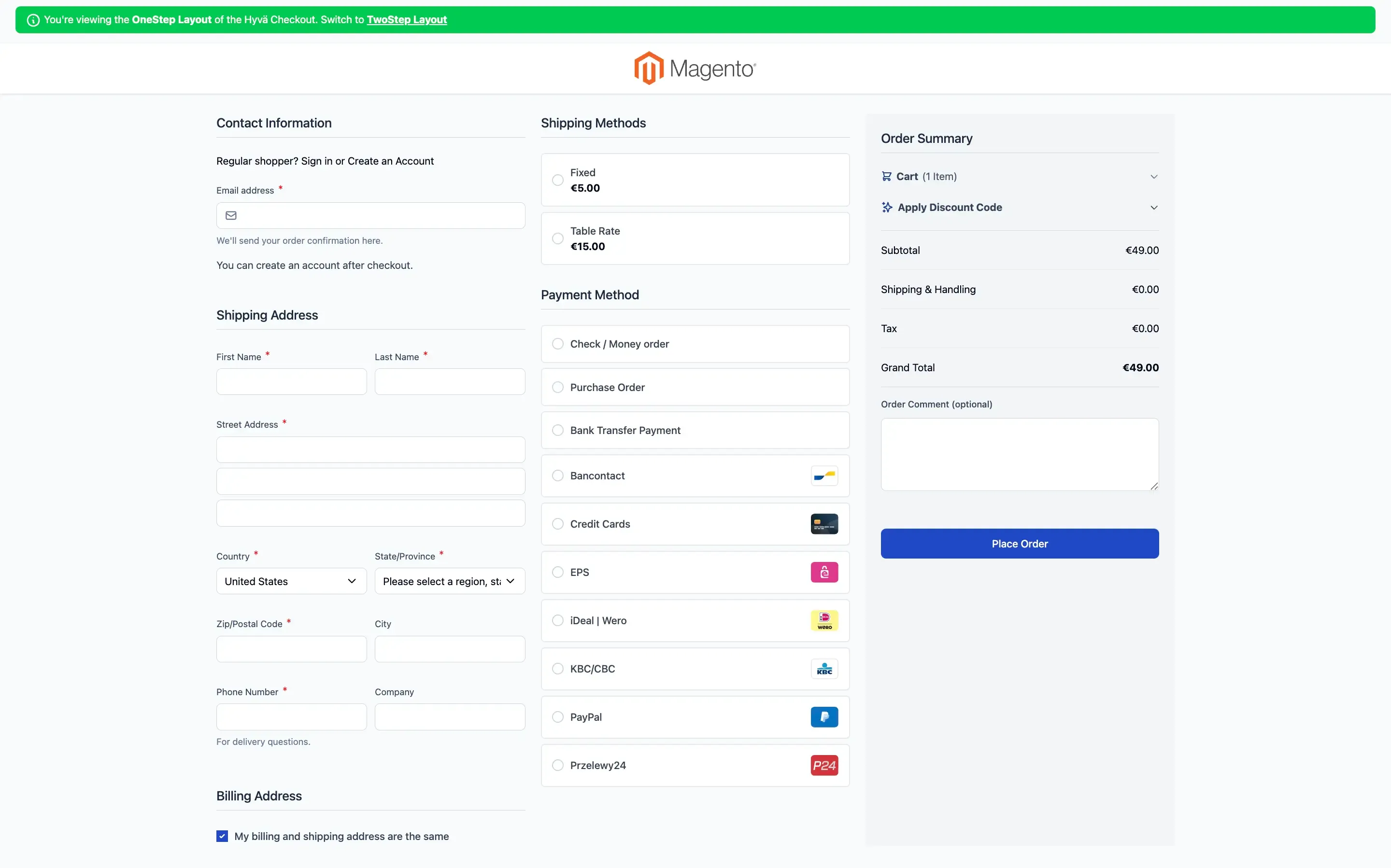
Hyvä Checkout is built on Magewire, a PHP-driven component framework inspired by Laravel Livewire. The frontend uses AlpineJS and Tailwind CSS — the same stack as Hyvä Theme itself. This means no JavaScript framework overhead, no Knockout.js, no RequireJS. The checkout page loads in under one second out of the box.
For developers, the architecture feels native to Magento. Customisation happens in PHP and familiar template files, not in a JavaScript framework. The official documentation covers everything from custom checkout layouts to payment method integration.
Merchants can configure the checkout as a one-page or two-step flow directly from the Magento admin panel. A separate mobile layout can be activated for mobile visitors, allowing different checkout experiences per device type. Because Hyvä Checkout can be scoped to specific store views, you can roll it out gradually — keeping your existing checkout on store views where Hyvä Checkout is not yet active.
What the Numbers Say
The case studies published on hyva.io show consistent conversion improvements across different verticals and geographies:
- SDS London (B2B, architectural ironmongery, UK): +28% conversion rate, +61% revenue within four months of going live with Hyvä Checkout. Configuration took just a few days.
- Barr Display (B2B, retail fixtures, USA, 9 physical stores): +47% conversion rate, +31% revenue, +20% average order value, −30% cart abandonment. Required ShipperHQ integration with Hyvä Checkout, which took the agency three days — including learning the Magewire framework.
- Bedre Nætter (B2C, bedding, Denmark): +67.5% conversion rate after A/B testing three different checkout solutions.
- ClearBags (B2B/B2C, packaging, USA): +10% checkout conversion lift across desktop and mobile, contributing to $1.2–1.3M in attributed revenue growth. This was a full migration to Hyvä Theme + Hyvä Checkout on Adobe Commerce, including NetSuite ERP integration via Celigo.
- Sweet Jewellery: 600 orders processed in one hour during peak season.
These are not hypothetical benchmarks. They come from production stores with tracked revenue attribution.
Pricing (2026)
Hyvä Checkout costs €1,000 as a one-time license fee. This covers one Magento 2 installation with unlimited domains and store views belonging to the same business entity. A free Hyvä Theme license is included with the purchase.
After the first year, support and updates are available at €250/year or €1,000 for five years. Hyvä Checkout is also included in Hyvä Commerce (€3,000/year), which bundles Theme, UI, Checkout, CMS, and additional features.
Limitations to Know
Hyvä Checkout has a hard dependency on Hyvä Theme — the checkout relies on features and functionality provided by the theme. If your store is not yet running Hyvä, you can use the reverse fallback mechanism to load Hyvä Theme only on the checkout page while keeping Luma for the rest of the store. But Hyvä Theme must be present on the checkout route.
Beyond the theme requirement: Hyvä Checkout does not yet support all B2B and Adobe Commerce-specific features, though coverage is expanding through Hyvä Enterprise. And because the checkout is built from scratch using Magewire, AlpineJS, and Tailwind CSS, standard Magento checkout integrations do not work out of the box. Each payment and shipping integration needs a Hyvä Checkout-compatible version. The Hyvä ecosystem is growing rapidly — over 1,000 extensions are now compatible — but you should verify your specific PSP and shipping stack against the official integration lists before purchasing.
Hyvä React Checkout: The Open-Source Alternative
The Hyvä React Checkout is a community-maintained, open-source checkout built with React and powered by Magento's GraphQL API. It is licensed under MIT and is completely free.
How It Works
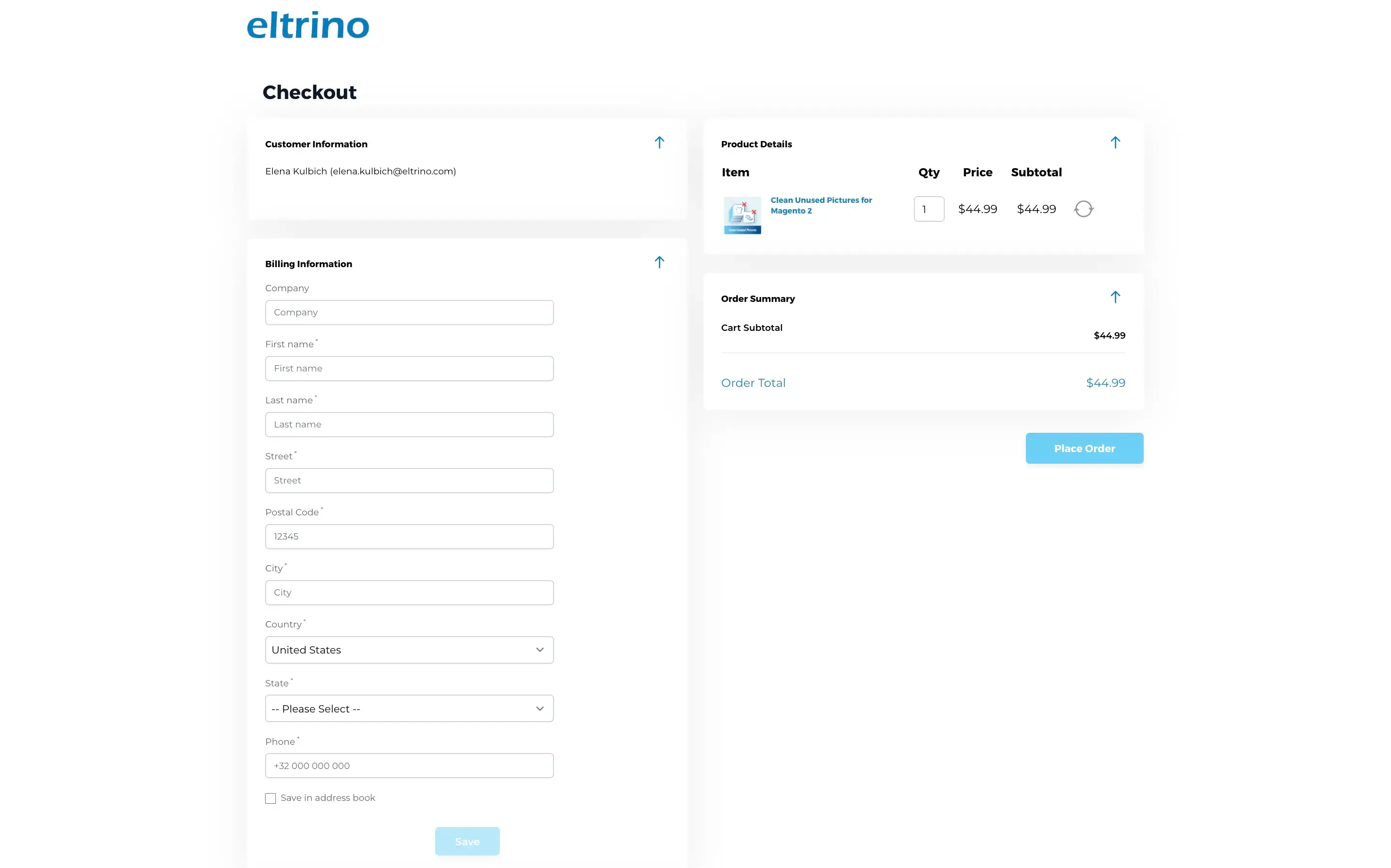
The React Checkout replaces the default Magento checkout with a React-based single-page application that communicates with Magento through GraphQL. It loads at /hyvareactcheckout/reactcheckout and replaces the default checkout when enabled in the Magento admin.
This is important: the React Checkout is explicitly described as a "toolbox to build your own checkout," not a plug-and-play solution. A developer with React knowledge is required. The intended workflow is to fork the repository or use the example module as a starting point and build your custom checkout on top of it.
Payment method integrations are added per project. Community-maintained repos exist for Stripe, Klarna, Braintree, and DHL shipping, among others. Each integration follows a package.json configuration pattern that pulls the payment module into the React build.
Clearing Up the Name Confusion
If you have encountered conflicting information about "Hyvä Checkout," the official Hyvä documentation explains why: the React Checkout was originally named "Hyvä Checkout" when it was first released. It has since been renamed, but older blog posts, extension vendor documentation, and forum threads still reference the original name. The rule of thumb from Hyvä's docs: if a source mentions "Hyvä Checkout" but references React components or a React frontend, it is talking about the React Checkout, not the commercial Hyvä Checkout product.
Eltrino's Experience with React Checkout
We built store.eltrino.com — our own extension store — using Hyvä React Checkout with a custom Stripe integration. The project took approximately 200 development hours and gave us full control over the checkout flow, payment UX, and Stripe Elements integration.
The React Checkout approach works well when you need a checkout experience that does not map to any standard template — custom payment flows, non-standard field logic, or deep PSP integration that goes beyond what preconfigured modules offer. But it requires React development expertise and ongoing maintenance. There is no official support team behind it — only the community.
The GitHub repository has 188 stars and 56 forks, and it is compatible with Magento 2.3.4 and higher. Community activity is present but less frequent than the commercially-backed Hyvä Checkout.
Limitations to Know
The React Checkout is not a finished product — it is a foundation you build on top of. That distinction matters for budgeting and planning:
- No official support. The Hyvä team does not maintain or support the React Checkout. If you hit a bug, your options are GitHub issues, community discussions, or fixing it yourself.
- Every PSP integration is custom work. Community repos exist for Stripe, Klarna, Braintree, and DHL, but they vary in quality and maintenance status. Any PSP not covered requires building a React integration from scratch against Magento's GraphQL API.
- React expertise is non-negotiable. A PHP/Magento developer cannot work on this checkout without React knowledge. This limits your pool of available developers and can create single-point-of-failure risks if the React developer leaves.
- No admin configuration. Unlike Hyvä Checkout (which offers admin-configurable layouts, mobile checkout, and store view scoping), the React Checkout has no admin UI. Every change requires code changes and a rebuild.
- Upgrade path uncertainty. Because the checkout is a fork-and-build model, merging upstream updates from the main repository into your customised fork can be complex. The more you customise, the harder upgrades become.
- GraphQL API dependency. The React Checkout relies on Magento's GraphQL API, which does not cover all Magento features — particularly B2B functionality, certain payment flows, and custom quote attributes. If your checkout logic requires data not exposed via GraphQL, you will need to extend the API yourself.
When React Checkout Makes Sense
The React Checkout is the right choice when your store needs a checkout experience that cannot be achieved through configuration — and your team has React developers available. It gives you headless-like flexibility without committing to a full headless architecture. If your PSP is not yet supported by Hyvä Checkout and building a custom React integration is feasible for your team, this path avoids the performance penalty of the Luma fallback.
It is not the right choice if you want a fast, low-effort checkout upgrade. The development investment is substantial, and the result depends entirely on the quality of your React implementation.
Luma Fallback: Keeping the Native Magento Checkout
Every Hyvä store can continue using the standard Magento Luma checkout through the theme fallback module. This is the default path for stores that have migrated to Hyvä Theme but have not yet addressed the checkout.
How the Fallback Works
The Hyvä theme fallback module (hyva-themes/magento2-theme-fallback) deactivates the Hyvä frontend for specific routes and loads a traditional Magento Luma or Blank-based theme instead. When a customer navigates to the checkout page, Magento loads the standard Luma CSS, RequireJS, Knockout.js, and jQuery — the full legacy frontend stack.
The fallback theme must be a traditional Magento Blank or Luma-based theme. Setting a Hyvä theme as the fallback will not work, because Luma-based checkouts require the legacy JavaScript stack.
This means the checkout page will not benefit from Hyvä's lightweight frontend. Customers experience fast page loads across the entire store, then hit a noticeably slower checkout. The performance contrast is jarring, and it can erode the trust your fast storefront has built.
When Luma Fallback Makes Sense
There are legitimate reasons to stay on the native checkout:
- You depend on extensions that only support Luma. If your checkout relies on a complex stack of extensions that have not been ported to Hyvä Checkout, the fallback keeps everything working while you plan a transition.
- You use Adobe Commerce B2B features heavily. Native Magento checkout has full B2B support. Hyvä Checkout's B2B coverage is growing through Hyvä Enterprise but is not yet complete.
- You are testing Hyvä Theme and have not budgeted for a checkout change yet. The fallback lets you migrate incrementally — storefront first, checkout later.
- You have already optimized your Magento Checkout. You may already have invested a lot in your Magento Checkout, and it works well. Magento Checkout doesn't equal terrible checkout; it can be fast, but it requires a lot of work.
The key trade-off is performance. Your customers will experience the full Luma JavaScript payload on the one page where speed matters most for revenue.
Third-Party One-Step Checkouts via Fallback
Several popular Magento checkout extensions can work alongside Hyvä Theme through the same fallback mechanism. Extensions like Amasty One Step Checkout or Mageplaza One Step Checkout offer Hyvä compatibility either through the Luma fallback or dedicated Hyvä-ready packages.
How They Work with Hyvä
These extensions are built on the Luma/Knockout.js stack. When used with Hyvä Theme, they run through the theme fallback module, the same mechanism as the native Luma checkout. Some vendors (notably Amasty) also provide dedicated Hyvä compatibility packages for specific features like delivery date selection and gift wrapping.
The advantage over the plain Luma checkout is a better UX out of the box: one-page layouts, drag-and-drop field ordering, Google address autocomplete, and admin-configurable layouts. The disadvantage is the same as native Luma fallback: the full legacy JavaScript stack loads on the checkout page.
Limitations to Know
- Full Luma stack penalty. Regardless of the UX improvements these extensions provide, they still load RequireJS, Knockout.js, jQuery, and the full Luma CSS on the checkout page. On a Hyvä store, this creates a visible performance cliff between the storefront and checkout.
- Styling mismatch. The checkout page runs on a different theme than the rest of the store. Even with CSS customisation, achieving a seamless visual transition from your Hyvä storefront to a Luma-based checkout requires additional design and frontend work.
- Vendor lock-in and subscription costs. Most major one-step checkout extensions have moved to subscription pricing. Amasty One Step Checkout Pro, for example, requires an active subscription for Hyvä compatibility packages. You are paying ongoing fees for an extension that fundamentally cannot match Hyvä's frontend performance.
- Compatibility fragility. Each Magento version upgrade risks breaking the extension. Each Hyvä Theme update can surface new fallback issues. You are maintaining compatibility across two frontend stacks — the Hyvä storefront and the Luma checkout — which doubles the QA surface.
- Not optimised for Hyvä's mobile experience. Hyvä Checkout offers a dedicated mobile layout that can be configured separately from the desktop checkout. Third-party Luma-based extensions do not have this capability within the Hyvä context — their responsive design is tied to the Luma frontend architecture.
When Third-Party Extensions Make Sense
If you are already running a well-configured third-party one-step checkout on your Magento store and your conversion rates are acceptable, migrating to Hyvä Theme does not force you to abandon it immediately. The fallback module keeps it working. This is a reasonable interim step while you evaluate Hyvä Checkout or React Checkout for a future phase.
How to Choose: A Decision Framework
Selecting a checkout is not a technology decision alone — it is a business decision tied to your conversion goals, development capacity, and existing integrations. Here is how to think through it:
"We run Hyvä Theme and want higher conversion rates with minimal development effort." → Hyvä Checkout. The case study data is strong, the Magewire architecture is familiar to Magento developers, and you can roll it out per store view. Verify your PSP and shipping stack against the integration tracker first.
"Our PSP or extension stack is not yet supported by Hyvä Checkout." → Check the Hyvä Checkout integration tracker — it is updated regularly and compatibility is growing fast. If your stack is covered, go with Hyvä Checkout. If it is not covered and you have React developers, consider Hyvä React Checkout for that specific integration. Otherwise, use Luma fallback as an interim solution while compatibility catches up.
"We need full control over checkout logic and have React developers." → Hyvä React Checkout. Fork the example module, build your custom flow, and own the entire checkout experience. Budget 150–300+ development hours depending on complexity and PSP integrations. This is what we did at Eltrino for store.eltrino.com.
"We run Adobe Commerce with heavy B2B features (negotiable quotes, company accounts, requisition lists)." → Native Luma checkout for now, or evaluate Hyvä Checkout + Hyvä Enterprise — check the Enterprise Checkout Feature Matrix for current B2B coverage. Coverage is expanding with each release.
"We want to test the impact before committing." → Start with Luma fallback, then deploy Hyvä Checkout on a single store view and use the elgentos A/B test module to measure conversion differences. The data will make your business case.
"We are already using Amasty / Mageplaza one-step checkout and it works fine." → Keep it running through the fallback module while you plan a transition. But monitor your Core Web Vitals on the checkout page specifically — if performance scores are dragging down your site-wide metrics, the switch to Hyvä Checkout will pay for itself in weeks, not months.
Summary
The checkout page is where your Hyvä investment either pays off or falls short. A store that loads in 1.6 seconds on product pages but takes 4+ seconds on checkout is leaving money on the table.
For most Hyvä stores, Hyvä Checkout is the fastest path to measurable results. The €1,000 license is a rounding error against the conversion gains documented in production case studies. For stores with unique checkout requirements and React expertise, the open-source React Checkout offers unmatched flexibility at zero licensing cost. And for stores in transition, the Luma fallback keeps everything working while you plan the next step.
Whatever you choose, do not leave your checkout as an afterthought. It is the page where performance directly equals revenue.
Need help choosing the right checkout for your Hyvä store — or implementing one? Talk to our team about a Hyvä checkout and performance audit.
FAQ
They are completely separate products with no shared codebase. Hyvä Checkout is a commercial product (€1,000) built by the Hyvä team using Magewire, AlpineJS, and Tailwind CSS. It is actively maintained with official support. Hyvä React Checkout is a free, open-source community project built with React and GraphQL, maintained by community contributors under the MIT license. The naming confusion exists because the React Checkout was originally called "Hyvä Checkout" when it was first released.
Yes. Hyvä Theme is a [hard dependency](https://docs.hyva.io/hyva-checkout/faq/hyva-theme-requirement.html) — the checkout relies on features and functionality provided by the Hyvä Theme. However, the rest of your store does not need to run on Hyvä. Luma-based stores can use the reverse fallback mechanism to load Hyvä Theme only on the checkout page while keeping their existing theme everywhere else. A Hyvä Theme license is included with every Hyvä Checkout purchase.
The license is €1,000 one-time for one Magento 2 installation with unlimited domains and store views. The first year includes support and updates. After that, support renewal costs €250/year or €1,000 for five years. Hyvä Checkout is also included in Hyvä Commerce at €3,000/year, which bundles Theme, UI, Checkout, and additional features like CMS and Admin Theme.
Yes. The Hyvä theme fallback module lets you keep the standard Luma checkout (or any Luma-based third-party checkout extension) by routing checkout routes to a traditional Magento theme. The trade-off is performance: the checkout page loads the full Luma JavaScript stack, which is significantly heavier than the rest of your Hyvä storefront.
Hyvä Checkout supports a growing list of payment and shipping integrations. Major providers like Mollie, Stripe, PayPal, Braintree, Buckaroo, Adyen, and many regional PSPs are supported. The full list is maintained on the official Hyvä documentation and the public Checkout Integration Tracker. Standard Magento checkout integrations do not work out of the box — each PSP needs a Hyvä Checkout-compatible module.
Yes, though development is community-driven and less frequent than the commercially-backed Hyvä Checkout. The GitHub repository under friends-of-hyva has 190 stars and 56 forks. Community support is available through GitHub Discussions. There is no official support from the Hyvä team for the React Checkout.
Yes. Hyvä Checkout can be scoped to specific store views, so you can keep your existing checkout on some store views while rolling out Hyvä Checkout on others. The elgentos A/B test module allows you to measure conversion differences between your current checkout and Hyvä Checkout before committing fully.
Adobe Commerce B2B features like negotiable quotes, company accounts, and requisition lists are not yet fully covered by Hyvä Checkout. Coverage is expanding through Hyvä Enterprise. For stores that depend heavily on these features, the native Luma checkout via fallback remains the most compatible option until Hyvä Enterprise reaches full B2B feature parity.
About the author
Olena Kulbych
CMO
With 12+ years at Eltrino, Olena bridges tech teams and business leaders, sharing Magento, Hyvä, Shopify, performance, and AI insights rooted in real-world eCommerce.