
How to Integrate Your Magento Store with Marketplaces (Amazon, eBay, Walmart, bol.com and Brand Marketplaces like H&M)
01.01.2026
Learn how to integrate Magento with marketplaces like Amazon, eBay, Walmart, bol.com, etc. Compare extensions vs channel tools, avoid pitfalls, and scale multi-channel sales. Magento Marketplace Integration Strategy Wizard
In the digital commerce era, reaching customers through multiple channels is crucial. Marketplaces can become your fastest growth channel: they already have traffic, trust, and customers ready to buy. With Magento, you can sell on major marketplaces like Amazon, Walmart, and bol.com and you can also expand through retailer marketplaces run by well-known brands (H&M, Douglas, Leroy Merlin, etc). Marketplace integration allows you to tap into the vast networks of these established marketplaces, leveraging their trust and credibility. Furthermore, it streamlines your operations by syncing inventory and simplifying order processing across all sales channels.
But marketplace integration is rarely a simple “install a connector.” The real challenge is choosing the right and cost-efficient strategy, so product data, stock, pricing, orders, shipping, and returns stay reliable across every channel without creating a maintenance nightmare.
What “marketplace integration” really includes
Marketplace integration is how your Magento store connects to external sales channels so everything stays consistent when you scale beyond your own website. It’s not just “export products.” A real integration keeps your catalog and operations in sync while stock changes, prices update, and orders flow in from different marketplaces.
What you need to sync
A proper Magento marketplace integration usually covers:
- Product data: titles, descriptions, images, attributes, variants, categories, identifiers (EAN/GTIN), and sometimes localized content per country/channel
- Pricing: base price plus channel-specific rules (fees, VAT, currency, discounts, rounding)
- Inventory: near real-time stock updates, channel buffers, multi-warehouse logic (if you have it)
- Orders: importing marketplace orders into Magento (or into ERP/OMS if that’s where you process them)
- Shipping & tracking: carrier mapping, partial shipments, tracking numbers, delivery updates
- Returns & cancellations: return requests, refunds, cancellations, and status updates (depends on marketplace + tool)
The more channels you add, the more important it becomes to standardize rules for stock allocation, pricing logic, and returns — otherwise the tech “works” but operations break.
Define your “source of truth” (before choosing tools)
This is the most important decision. It impacts cost, stability, and how easy it will be to add more marketplaces later.
Option A - Magento is the source of truth Magento is the master for product data, pricing, and stock. Marketplaces receive updates from Magento, and orders come back into Magento.
Best when: 1–2 marketplaces, smaller catalog, simple fulfillment, Magento is your main operational system.
Option B - ERP/PIM/OMS is the source of truth
- PIM owns product data (attributes, translations, media, taxonomy)
- ERP/OMS/WMS owns inventory, allocations, fulfillment, returns Magento remains the storefront layer, but it’s not the only system controlling the business.
Best when: multiple marketplaces/countries, large catalog, complex attributes, multi-warehouse, or strict fulfillment/returns workflows.
Rule of thumb:
- Start with Magento-as-master if you’re launching marketplaces for the first time.
- Move towards PIM/ERP/OMS-as-master (or a strong channel hub) when you scale channels, countries, and operational complexity.
Step 1 - Choose marketplaces first where you actually want to sell
Before you compare connectors or platforms, decide where you actually want to sell. Your marketplace mix determines integration cost, operational complexity, and how scalable your setup will be.
Open marketplaces vs retailer marketplaces
Open marketplaces are large platforms where many sellers can list and compete, for example Amazon, eBay, Walmart, and bol.com. Onboarding is usually faster, the reach is huge, and competition is intense.
Retailer marketplaces are run by well-known brands and retail chains that open their online store to selected third-party sellers (a curated model). Examples include retailers like H&M, Douglas, Leroy Merlin, MediaMarkt, and many others. These channels often have stricter assortment rules and service-level requirements.
A simple way to view it:
- Open marketplaces = scale fast, compete hard
- Retailer marketplaces = curated access, higher standards, strong brand context
Retailer marketplaces explained (Mirakl, Spryker, and VTEX)
Many retailer marketplaces are powered by marketplace platforms that provide the “operator layer”: seller onboarding, product/offer rules, order routing, performance metrics, and sometimes retail media tooling.
Mirakl is one of the most widely used platforms for retailer marketplaces. It’s used by a broad range of retailers and enterprises across fashion, electronics, grocery, DIY, and B2B distribution. Typical examples often associated with Mirakl-powered marketplace models include retailers like Carrefour, Kroger, H&M, Macy’s, Best Buy, and others (plus B2B players).
(Exact marketplace availability always depends on the retailer’s current seller program and country.)
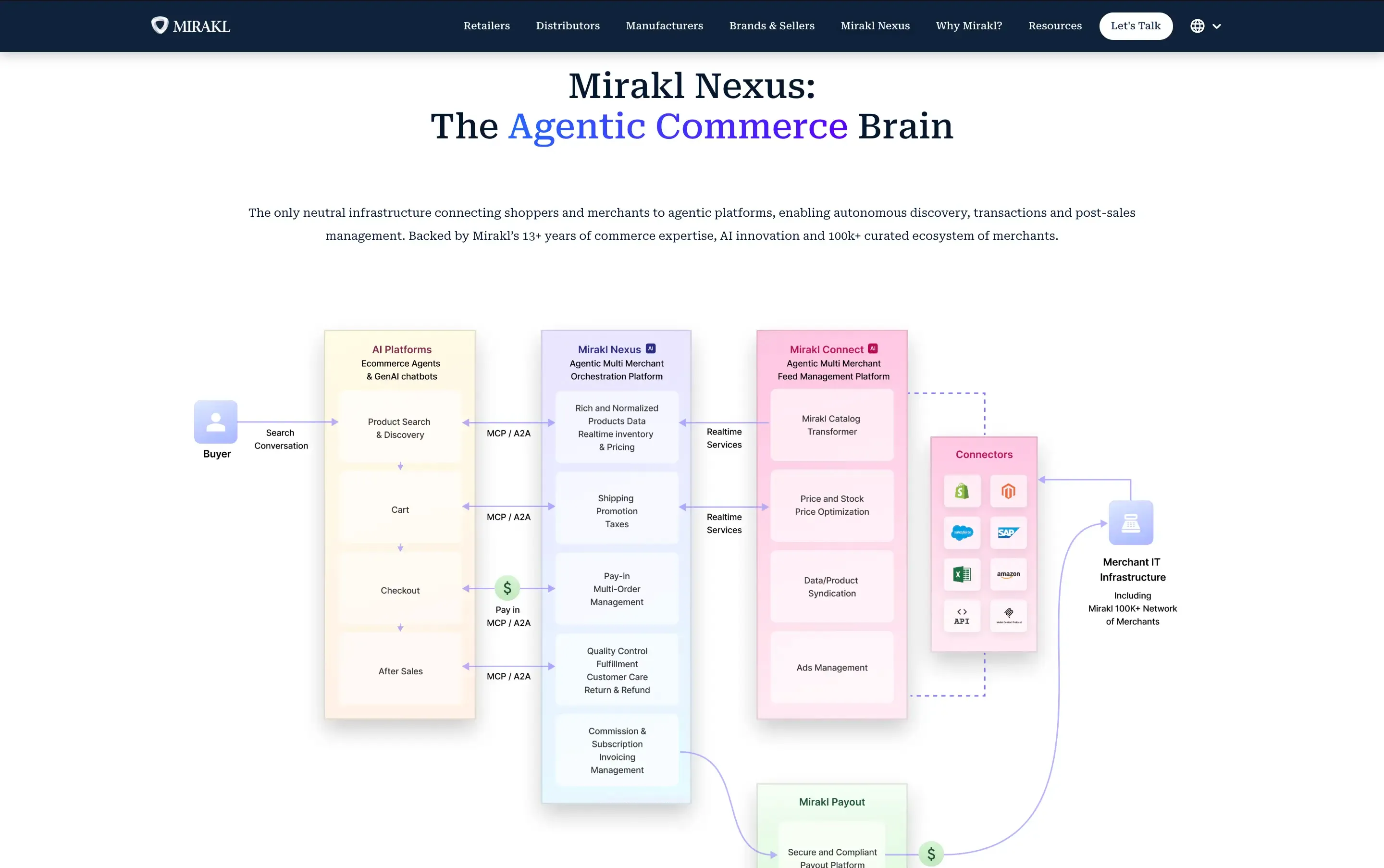
Other common enterprise platforms that can support retailer marketplace models include:
- Spryker (enterprise commerce platform with marketplace capabilities)
- VTEX (commerce platform known for supporting marketplace operations)
What makes retailer marketplaces different
- Curated onboarding: not every brand is accepted; assortment and brand fit matter
- Operational SLAs: shipping speed, cancellations, and return handling impact performance and eligibility
- Higher content requirements: attributes, images, identifiers, and category rules are stricter
- More process: you’re expected to run the channel reliably, not just “list products”
Marketplace selection criteria
- Country + audience fit: where your customers already buy
- Category fit: fashion vs electronics vs DIY vs beauty vs B2B
- Unit economics: fees + ads + shipping + returns → can you keep margin?
- Competition: are you competing on price, selection, or brand value?
- Returns reality: especially important for fashion/footwear
- Onboarding effort: open marketplaces are faster; retailer marketplaces can take longer
- SLAs: shipping times, cancellations, return windows, packaging rules
- Operational readiness: customer service capacity and stock accuracy across channels
Step 2 - Choose a cost-efficient integration strategy (based on your channel mix)
Once you’ve selected marketplaces, the next step is choosing how to integrate them with Magento. This decision has a bigger impact on long-term cost than most merchants expect, because the “tool price” is only one part of the total cost. Implementation time, data mapping, and ongoing maintenance often matter more.
Below are the three most common strategies.
Option A - Magento extensions (best for 1–2 marketplaces)
Magento extensions integrate your store directly with specific marketplaces. They work inside your Magento setup and give you hands-on control over listings, pricing rules, and inventory sync.
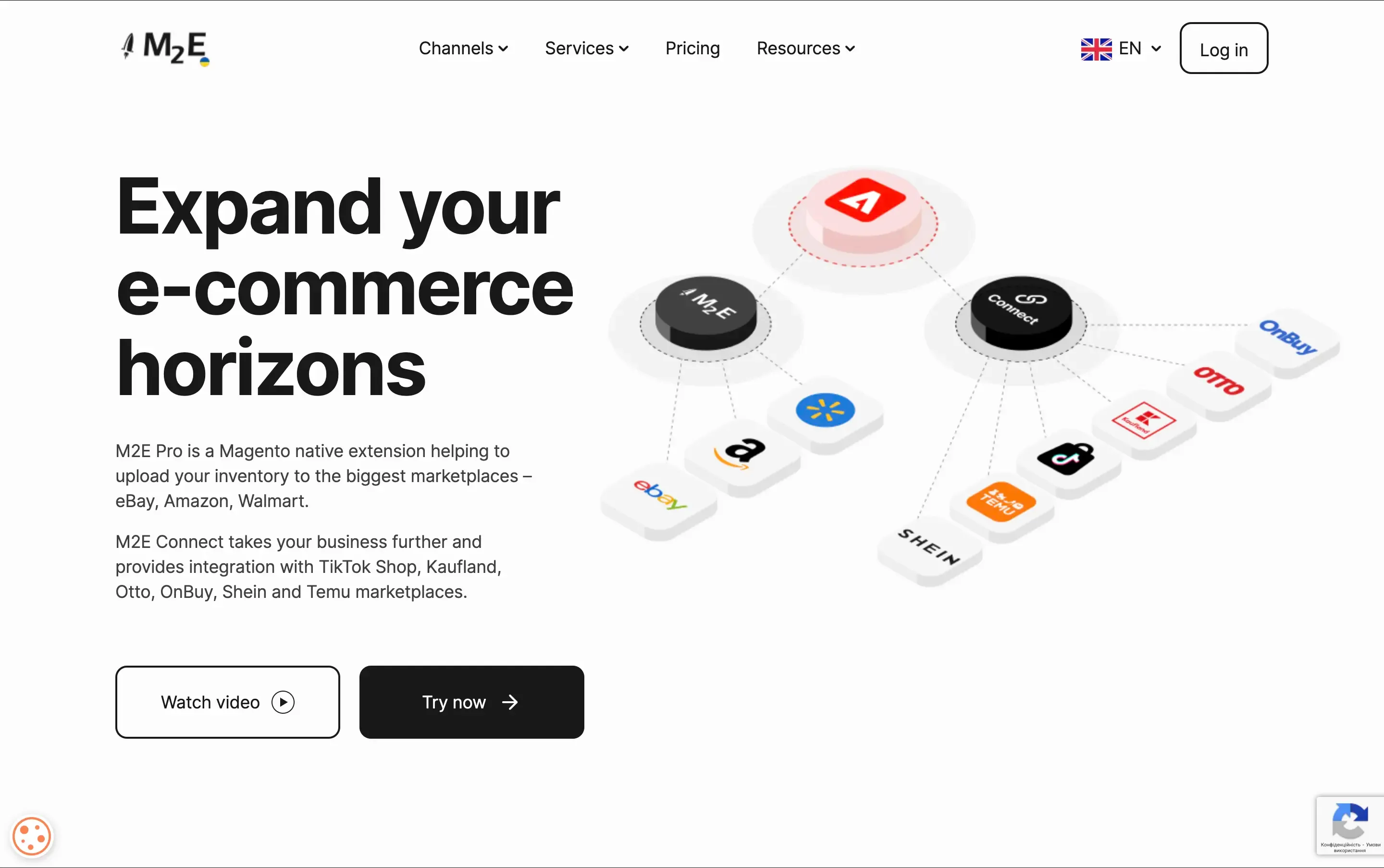
Example extension
- M2E Pro — supports Amazon, eBay, and Walmart.
Pros
- Works inside Magento (familiar workflows)
- Direct control over listings and stock
- Good fit when Magento is your main “source of truth”
Cons
- Setup can be technical (attributes, categories, policies, shipping/status mapping)
- Scaling to many marketplaces can mean managing multiple connectors
- Ongoing maintenance: Magento upgrades + marketplace API changes require testing and updates
Best for
- Merchants selling on 1–2 marketplaces and wanting marketplace operations managed directly in Magento.
Option B - Channel management platforms (best for 3+ marketplaces / multi-country)
Tools like Channable, ChannelEngine, and Koongo offer centralized management of multiple marketplaces. They streamline the integration process, making it easier to handle product listings and orders. While they provide ease of use and scalability, they also come with ongoing subscription costs and may offer less customization than direct extensions.
- Channable: Manages product feeds and automates PPC. Channable.
- ChannelEngine: Simplifies integration with various marketplaces. ChannelEngine.
- Koongo: Automates product data and order synchronization. Connects with various marketplaces and social platforms. Offers a 30-day free trial. Koongo, Koongo offers the lowest prices comparing to other Channel Management Tools. Koongo Pricing.You can find a handy cost calculator on their website. For instance, to connect your store with one Marketplace and sync 2000 SKUs and 100 orders per month with 30 minutes items update frequency will cost €34/month.
- Pros: Centralized management of multiple marketplaces.
- Cons: Involves ongoing subscription costs and may offer less customization.
Best for
- Merchants expanding to multiple marketplaces, multiple countries, or needing a single place for mapping rules and monitoring.
Option C - Custom integration (best for complex ops / ERP-first)
Custom integration makes sense when the “hard part” isn’t listing products, it’s your operations. For example:
- ERP/OMS is the main system for orders and fulfillment
- multi-warehouse stock allocation/reservations
- complex pricing rules per channel/country
- advanced returns/cancellation flows
Pros
- Fits your real business processes (not the other way around)
- Can be optimized for reliability and performance
- Scales well for complex enterprises
Cons
- Higher upfront investment
- Requires long-term ownership (monitoring, support, improvements)
Best for
- High-volume or operationally complex merchants where marketplaces are strategic.
How to connect to retailer marketplaces (2 routes)
Retailer marketplaces (often Mirakl-based) can usually be connected in two ways:
Route 1 — Direct connection via a Mirakl connector
- You connect Magento directly to the retailer marketplace environment using a Mirakl seller connector.
- Best when retailer marketplaces are a major focus and you want a direct setup.
Route 2 — Via a channel hub (e.g., ChannelEngine)
- Magento connects to the channel platform, and the platform connects to retailer marketplaces (including Mirakl-based ones).
- Best when retailer marketplaces are part of a bigger channel mix and you want one central place for rules and monitoring.
Costs (beyond the sticker price)
When merchants compare “module vs platform,” they often look only at licenses. A more realistic cost comparison includes:
- Tool cost: license/subscription
- Implementation: mapping categories/attributes, shipping methods, taxes, order statuses, error handling
- Operations: stock buffers, pricing rules, returns/cancellations workflows
- Maintenance: platform updates + API changes + troubleshooting sync failures
- Scaling cost: adding new channels/countries and keeping rules consistent
Rule of thumb
- If you have limited technical resources, a channel management platform can reduce complexity.
- If you need deep control inside Magento and run only a few channels, direct extensions can be efficient.
- If you run ERP-first operations, custom integration (or a hybrid) may be the most stable long-term.
Example: How to sell on H&M marketplace (step-by-step)
How to sell on H&M (example flow) H&M’s marketplace is a curated retailer marketplace, so the first step is partner approval, not the integration tool.
-
Apply to become a partner: register your interest via H&M Group’s “Partner with H&M Group” process. (H&M Group)

-
Intro call + eligibility check: H&M books an intro call with eligible applicants to discuss the partnership.
-
Onboarding: approved partners are onboarded and set up to start selling through H&M Group channels.
-
Integration choice (after approval) since H&M is Mirakl-based, you typically connect in one of two ways:
- Direct: connect Magento to Mirakl using the Mirakl seller connector for Adobe Commerce. (Adobe Commerce Marketplace)
- Via a channel hub: if you use ChannelEngine, H&M can be connected through Mirakl Connect SSO in ChannelEngine. (ChannelEngine)
Comparing Integration Methods:
Direct Magento extensions offer more control but can be complex and require more maintenance. In contrast, third-party tools offer scalability and ease of management, especially useful for businesses looking to expand quickly across multiple marketplaces. When it comes to integrating your Magento store with various marketplaces, the approach you choose should align with your business's unique requirements. Consider factors like the size of your product catalog, the volume of orders per month, the number of marketplaces you plan to sell on, the number of store views for different countries, and your margin per order.
For those just starting out with marketplace selling, it's wise to focus on one or two channels initially. This allows you to fine-tune your strategy before expanding further. On the other hand, if you're already successful in marketplace selling but lack synchronization with your web store, channel management tools like Channable, ChannelEngine, or Koongo could be the next step.
Need guidance on what's best for your Magento store from a technical perspective? We're here to help. Our expertise covers both methods of integration, and we can provide consultation to streamline your setup. From our experience, both direct Magento extensions and third-party tools have their merits, and we can assist in setting up whichever solution aligns with your business goals.
Ready to sync your Magento store with top marketplaces and optimize your eCommerce strategy? Let's connect and explore the best options for your business growth. 🚀🛒
Magento Marketplace Integration Strategy Wizard
About the author
Olena Kulbych
CMO
With 12+ years at Eltrino, Olena bridges tech teams and business leaders, sharing Magento, Hyvä, Shopify, performance, and AI insights rooted in real-world eCommerce.