Add Stripe card payments and Google Pay to Hyvä React Checkout for Magento 2. Free open-source module by certified Hyvä developers. Step-by-step setup guide.
If you're running a Magento 2 store with the Hyvä Theme, you already know the performance gains are significant — lighter pages, faster load times, better Core Web Vitals. But when it comes to checkout, choosing the right solution and connecting it with a reliable payment processor is where things get interesting.
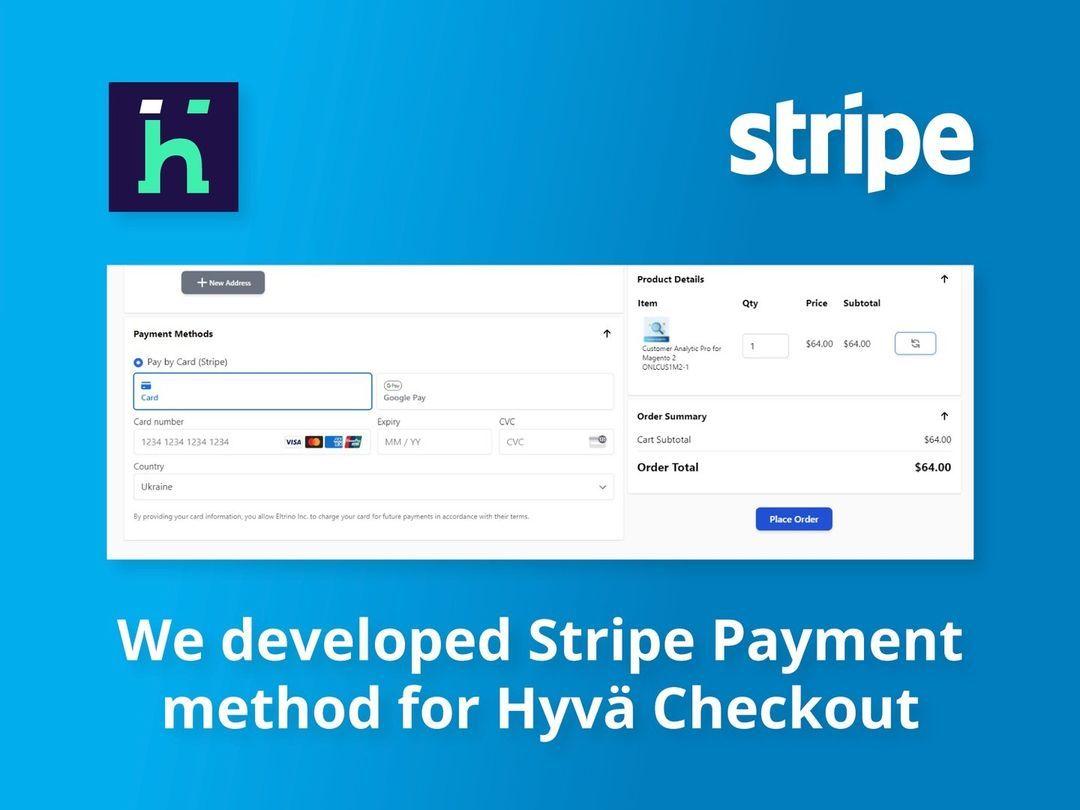
The Eltrino team, as a Silver Hyvä partner and experienced Hyvä developers, built a free open-source Stripe Payment method for Hyvä React Checkout. This module adds Pay by Card and Google Pay options directly to your React-powered checkout flow giving your customers a fast, secure way to complete their purchase.
In this guide, we'll cover the three checkout options available to Hyvä Theme stores, explain where our Stripe module fits in, and walk you through the full installation process.
Checkout Options for Magento Stores Running Hyvä Theme
When you build or migrate your Magento 2 store to the Hyvä Theme, you're not locked into a single checkout experience. There are three main paths, each with different trade-offs in terms of cost, customizability, and development effort.
Option 1: Native Magento Checkout
The simplest approach is to keep Magento's default checkout as-is. Since Hyvä Theme replaces the frontend (catalog pages, product pages, cart, etc.) but can leave the checkout untouched, your existing Knockout.js-based checkout continues to work. All your current payment method extensions remain compatible without modifications.
This is a pragmatic choice if your checkout already works well, you have complex payment integrations you don't want to rebuild, or you want to minimize the scope of a Hyvä Theme migration. The downside is that customers experience a noticeable shift in look and speed when they move from the fast Hyvä-powered pages to the heavier default checkout.
Option 2: Hyvä Checkout (Official Commercial Product)
Hyvä Checkout is a commercial checkout product built and sold by the Hyvä team. It costs €1,000 as a one-time license (with optional yearly support at €250/year) and comes with a free Hyvä Theme license included.
Hyvä Checkout is designed as a high-performance, conversion-optimized replacement for Magento's default checkout. It addresses well-known usability issues that cause cart abandonment: slow page loads, complex form layouts, and limited express payment options. According to the Baymard Institute, fixing common checkout UX problems can improve conversion rates by an average of 35%.
This is the official, commercially supported option — ideal for merchants who want a polished, maintained checkout solution with direct support from the Hyvä team.
Option 3: Hyvä React Checkout (Community Open-Source Project)
The Hyvä React Checkout is a free, open-source checkout for Magento 2 built with React. It's developed and maintained by the friends-of-hyva community (with major contributions from integer_net GmbH), and released under the MIT license.
This React-based checkout replaces Magento's default checkout at /hyvareactcheckout/reactcheckout and is designed as a developer's toolbox — highly customizable, but intended to be extended and tailored to each store's specific needs. A developer with React knowledge is required to get the most out of it.
The React Checkout uses an extension mechanism that allows Hyvä developers to build custom checkout experiences on top of its foundation, using the checkout example module as a starting point.
This is the checkout that Eltrino's Stripe integration is built for.
Quick Comparison
| Feature | Native Magento Checkout | Hyvä Checkout (Official) | Hyvä React Checkout (Community) |
|---|---|---|---|
| Cost | Free (included with Magento) | €1,000 one-time license | Free (MIT license) |
| Technology | Knockout.js | Proprietary Hyvä frontend | React |
| Customizability | Limited by Magento's architecture | Configurable, officially supported | Highly customizable (developer-focused) |
| Support | Magento community / Adobe | Hyvä team (Slack, portal) | Community (GitHub, Discussions) |
| Developer requirement | Magento frontend developer | Moderate | React developer needed |
| Best for | Quick migrations, existing integrations | Merchants wanting a supported, polished solution | Teams with React expertise wanting full control |
What Eltrino's Stripe Integration Does
Our open-source module bridges Stripe's payment infrastructure with the Hyvä React Checkout. It plugs into the React Checkout's extension system and adds two payment methods:
Pay by Card — Customers enter credit or debit card details directly within the checkout flow. The integration uses Stripe Elements for PCI-compliant card collection, so sensitive card data never touches your Magento server.
Google Pay — On supported devices and browsers, Google Pay appears as an express payment option. Customers with cards stored in their Google account can check out in a single tap, significantly reducing friction at the payment step.
Both methods process through Stripe's secure infrastructure, giving merchants access to Stripe's fraud protection, reporting dashboard, and global payment processing across 135+ currencies.
The module is freely available on GitHub: eltrino/magento2-hyva-checkout-stripe
Prerequisites
Before installing the Stripe payment method, make sure your environment meets these requirements:
1. A working Magento 2 site with Stripe installed and configured. You need the official Stripe module for Magento 2 set up with your API keys and payment configuration.
2. Hyvä React Checkout is installed and configured. The Hyvä React Checkout module must be installed and active on your store. This is the community React-based checkout from friends-of-hyva — not the official Hyvä Checkout product.
3. The Checkout Example Module is active. Make sure you are using the Hyvä React Checkout Example Module for customizations. This template provides the scaffolding that payment method integrations hook into.
4. Eltrino's additional Stripe API module. Install our additional module which adds extra API resources to Magento that the Stripe checkout integration requires for communication between the React frontend and Magento's backend.
Step-by-Step Installation Guide
Once all prerequisites are in place, follow these steps to install and activate Stripe payments within your Hyvä React Checkout:
Step 1: Register the Payment Method Repository
Open the package.json file inside your React application folder (this is the Hyvä React Checkout app directory, not your Magento root). Add the Stripe payment method repository to the config section:
"config": {
    "paymentMethodsRepo": {
        "stripe_payments": "git@github.com:eltrino/magento2-hyva-checkout-stripe.git"
    }
}
This tells the React Checkout build system where to pull the Stripe payment component from.
Step 2: Install Stripe JavaScript Dependencies
The integration relies on Stripe's official React and JavaScript libraries. Install them inside the React application folder:
npm i @stripe/react-stripe-js@^1.6 @stripe/stripe-js@^1.21
These packages provide Stripe Elements components and the Stripe.js library needed to securely handle payment data on the frontend.
Step 3: Install All Dependencies
Run the standard npm install command to pull in all registered dependencies, including the Stripe payment method module:
npm install
Step 4: Build the Application
Create the production build of your checkout with the Stripe payment method bundled in:
NODE_ENV=production npm run build
After the build completes, clear your Magento cache. Stripe should now appear as a payment option during checkout.
Step 5: Verify and Test
Place a test order using Stripe's test card numbers (for example, 4242 4242 4242 4242) to confirm card payments work correctly. If you're testing on a supported device, verify that Google Pay also appears and functions as expected.
Customization and Further Resources
The Hyvä React Checkout is designed to be extensible, and the Stripe integration follows the same patterns. For advanced customization:
- Hyvä React Checkout Documentation — Full docs covering installation, configuration, and the extension architecture.
- Checkout Customization Guide — How to modify checkout behavior, layout, and styling.
- Payment Integration Docs — Details on the payment method integration architecture for building or modifying payment modules.
Why Hyvä Theme with Stripe Is a Strong Stack for Magento
The combination of Hyvä Theme development and Stripe payment processing gives Magento 2 merchants a compelling technology stack:
Performance — The Hyvä Theme eliminates heavy JavaScript bundles that slow down traditional Magento frontends. Pages load faster, Core Web Vitals improve, and customers experience a smoother journey from browsing through checkout.
Flexibility — With three checkout options to choose from, Hyvä developers can match the checkout approach to the merchant's specific needs, budget, and team capabilities. The Hyvä React Checkout gives maximum control for teams comfortable with React.
Global Payment Support — Stripe handles 135+ currencies and dozens of payment methods worldwide, making it well-suited for Magento merchants selling internationally. Combined with a fast Hyvä-powered frontend, customers anywhere get a consistent, high-quality experience.
Developer Experience — For Hyvä developers, working with a React-based checkout means using modern frontend tooling rather than Magento's legacy Knockout.js architecture. Customizations are faster to build and easier to maintain.
Key Takeaway
If you're using the Hyvä React Checkout on your Magento 2 store and need Stripe payment processing, you don't have to build the integration from scratch. Eltrino's open-source module connects Stripe's card and Google Pay capabilities directly into the React Checkout's extension system, free and ready to use.
The installation takes minutes when you have the prerequisites in place. For more complex setups, multi-store configurations, or full Hyvä Theme development projects, our team of Hyvä developers is ready to help.