

Magento migrations
Move Right
Magento migrations demand serious investment. We make sure you never pay double, sparing you from downtime, missing data, lost SEO, tangled integrations, or a frontend do-over one year later
Magento migration types
🔄 Magento 1 → Magento 2
Still the most common migration in 2026, and the most urgent for anyone still running it. Official Magento 1 support ended in June 2020. No security patches have been released since. Payment providers (Visa, Mastercard, Paypal) flag Magento 1 stores as non-compliant with PCI DSS, which in turn can cost you the merchant account you need to take card payments.
⬆️ Magento 2 version upgrade
If you're already on Magento 2 but a few minor versions behind the 2.4 version, such an upgrade can be as complex as a migration. It's smaller in scope than M1→M2 but still involves extension compatibility work, theme adjustments, and regression testing.
Luma → 🚀Hyvä
If you have a webshop with the Luma theme, you are very likely to have heard about the Hyvä theme, which solves performance issues. But now it's a whole suite with Hyvä Commerce: CMS, a customizable Admin Dashboard with widgets and role-based views, a built-in Image Editor so your team stops leaving Magento to crop or resize product photos, and automated media optimization (WebP/AVIF, CDN-friendly) that handles image performance without anyone thinking about it.
🏢 Magento Open Source → Adobe Commerce or Adobe Commerce Cloud
Adobe Commerce adds licensed features that Open Source doesn't: native B2B (shared catalogs, company accounts, approval workflows, requisition lists), customer segmentation, content staging, advanced reporting, official SLAs. Adobe Commerce Cloud bundles that with managed AWS hosting.
Worth moving to when the licensed features justify the annual cost (usually €20,000+ per year depending on revenue). For most merchants under €20M revenue without heavy B2B requirements, Open Source is still the right answer. Our detailed breakdown of Magento vs Adobe Commerce walks through the decision in depth.
🚚 Another platform → Magento
Happens when custom business logic, B2B complexity, or integration depth outgrows what the current platform can handle. Common triggers:
- Shopify merchants who need multi-store operations with complex pricing rules that Shopify Plus price lists can't handle
- WooCommerce stores where the WordPress stack starts buckling under catalog size or traffic
- BigCommerce stores hitting API rate limits or customization ceilings
- PrestaShop merchants who want Magento's extension ecosystem and B2B features
🧩 Magento → headless frontend
Technically not a replatforming because you keep Magento as the commerce backend and build a new frontend that runs independently. This makes sense when the frontend is a real differentiator (custom UX, very high traffic, PWA requirements) or when the frontend team needs to ship on a different cadence than the backend team.
🔀 Magento → Shopify
If your business doesn't actually use what Magento is good at, like flexibility, multi-store, complex product logic, deep integrations, B2B, then Magento is overhead. Shopify is cheaper to launch, faster to change, and easier to staff for. Check our Shopify migration services and Magento to Shopify migration guide (2026).
We handle:
✓ Magento 1 → Magento 2
✓ Magento 2 → latest Magento 2 version
✓ Magento Open Source → Adobe Commerce or Adobe Commerce Cloud
✓ Shopify, WooCommerce, BigCommerce, or PrestaShop → Magento
✓ Luma → Hyvä (usually paired with one of the above)
✓ Magento monolith → headless frontend (Alokai)
Modernize while you migrate: Hyvä and headless
A 2026 Magento migration without modernizing the frontend is a missed opportunity. You're already paying for a rebuild; the same budget can replace the Luma legacy with Hyvä or a headless stack — and that's where most of the ROI actually lives.
Luma → Hyvä during migration
Luma is the default Magento frontend that's shipped since 2015. It's heavy, JS-dependent, and most independent PageSpeed audits on Luma stores come back in the red. Hyvä was built as the modern replacement — and in the years since its first release, it has grown from a single theme into a full Magento frontend suite. What started as a performance play is now as much about the merchant experience as it is about page speed.
What Hyvä is in 2026:
Hyvä Theme — the open-source frontend that replaces Luma. Built on Alpine.js and Tailwind CSS. Free under BSD licence. This is the core of nearly every Hyvä project.
Hyvä UI — a commercial component library (€250 one-time) that accelerates custom frontend work. Pre-built buttons, forms, modals, sliders, and page sections on Hyvä, so bespoke designs ship faster.
Hyvä Checkout — a commercial, single-page replacement for Magento's default checkout (€1,000 one-time plus €250/year support). Significantly faster than the Luma-era multi-step checkout and the default choice for most Hyvä builds.
Hyvä React Checkout — an open-source, React-based alternative to the commercial Hyvä Checkout, maintained by the friends-of-hyva community on GitHub. Used where a project needs a React-based checkout or custom payment integrations. Eltrino built and open-sourced a Stripe integration for Hyvä React Checkout, and runs our own extension store at store.eltrino.com on the stack.
Hyvä Commerce — a commercial merchant suite (€3,000/year per Magento installation) built for Magento Open Source. Bundles Hyvä Theme, Checkout, and UI with a set of tools that address long-standing Magento admin pain points: Hyvä CMS (a live-preview content editor that replaces Magento's Page Builder), a modern Admin Theme and customizable Admin Dashboard with widgets and role-based views, a built-in Image Editor so your team stops leaving Magento to crop or resize product photos, and automated media optimization (WebP/AVIF, CDN-friendly) that handles image performance without anyone thinking about it.
Hyvä Enterprise — (+€2,500/year on top of Commerce) for Adobe Commerce merchants. Adds compatibility with Adobe Commerce's native B2B modules, Live Search, and Adobe's AI tools, so you get Hyvä's frontend and merchant tools without losing the commercial features you're paying Adobe for.
During a migration, most projects use the open-source Theme, usually paired with the commercial Hyvä Checkout. The Hyvä extension ecosystem has expanded meaningfully — most popular Magento extensions now ship Hyvä-compatible versions released directly by the original vendor, which means the "will my extensions work on Hyvä?" question has a materially better answer in 2026 than it did two years ago.
We've been working with Hyvä since its first release, we're a Hyvä Silver Partner, and our open-source Stripe integration for Hyvä React Checkout is part of what we contribute back to the ecosystem.
Our published Luma vs Hyvä benchmark documents the performance gap in detail.
What changes for your team:
Content management that doesn't hurt — Hyvä CMS replaces Magento's Page Builder with a live-preview editor your content team can actually use. Edits render as you make them instead of in a separate preview tab.
A modern admin — the Hyvä Admin Theme and customizable dashboard surface the numbers your team actually looks at — sales, orders, system health, recently updated content — without digging through multiple reports.
Image work stays inside Magento — the built-in Hyvä Image Editor means your team stops exporting images to Photoshop or Figma just to crop or resize them. Automated media optimization handles WebP/AVIF conversion and responsive delivery in the background.
If you're rebuilding the frontend anyway, it's the natural moment to rationalize your extension stack around what Hyvä Commerce now ships by default.
Switching during a migration is logistically easier than doing it later as a separate project. You're already disturbing frontend, design, and QA — disturbing them once costs less than disturbing them twice.
Magento → headless
For merchants where the frontend matters more than the default monolithic setup can serve, we migrate to a headless stack:
- Alokai (Vue Storefront) — the most mature Magento-compatible PWA frontend, and the stack behind our long-running Eva.ua engagement
- Custom Next.js — when specific requirements don't fit off-the-shelf
Headless doubles your infrastructure complexity and needs a bigger engineering budget. Worth it when the frontend is a differentiator, not worth it otherwise.
When monolith is still the right answer
Not every merchant benefits from headless. If you don't have a frontend team, a heavy PWA requirement, or traffic that justifies the separate deployment, Hyvä on a monolith is cheaper, simpler, and entirely capable of delivering a fast, modern store. Honest advice from people who build both.
What we migrate
Store data
Products of every type (simple, configurable, bundle, grouped, virtual, downloadable), product attributes and attribute sets, categories, customers and customer groups, orders, invoices, credit memos, shipments, and quotes. Reviews and ratings. Cart price rules, coupons, catalog price rules. CMS pages, static blocks, and hierarchical CMS content. Tax rules and rates, shipping methods, payment configurations. Admin users and roles. Multi-store configurations and store views.
We use Magento's official Data Migration Tool where it fits and custom migration scripts where it doesn't — particularly for non-standard attributes, custom entities, or when data needs transformation mid-migration.
Theme and design
A migration theme is never a straight port. We either rebuild your existing design on Hyvä, redesign from scratch on Hyvä, or build a fresh headless frontend. Luma extensions often ship frontend code that needs to be rewritten or replaced on Hyvä — we audit every extension's frontend impact during scoping so there are no surprises in week four.
Custom code and extensions
Every extension on the source store gets audited. Most popular ones have M2 or Hyvä-compatible versions released by the original vendor. Some need replacement by M2 equivalents. A small number need custom rebuilds from scratch.
We don't automatically try to port M1 code into M2. The underlying architecture is different enough that a port usually costs more — and breaks more — than a clean rewrite. Same logic applies when moving from Luma to Hyvä: we rebuild rather than migrate-in-place wherever the original code was tightly coupled to the old frontend framework.
SEO assets
URL redirect mapping from old to new, 301s tested end-to-end before go-live, metadata migration, sitemap regeneration, canonical audit, schema.org markup, Search Console property handover, and ranking monitoring for 30 days post-launch. This is the area most often underspecified in migration quotes — and where search rankings actually live.
Security and compliance
Latest Magento 2 security patches, PCI DSS compliance verification, two-factor authentication on admin, admin URL obfuscation, and Content Security Policy headers. If you're migrating from Magento 1, this isn't optional — without current patches, your payment provider can and sometimes does revoke your merchant account.
Our migration process
Phase 1 — Technical audit and scoping (2–4 weeks)
We examine your current store: codebase, extensions, database, integrations, performance, and security posture. You get a written audit identifying what migrates cleanly, what needs rebuilding, what gets replaced, and what's genuinely broken and should be fixed while we're in there anyway. The audit is the foundation for the scope and the quote — and it's where most migration projects quietly fail when they're rushed.
Phase 2 — Migration plan and architecture (1–2 weeks)
Target stack decisions (Open Source vs Adobe Commerce, Luma vs Hyvä vs headless, hosting, CDN, search). Data migration approach. Extension-by-extension plan. SEO redirect map draft. Detailed cutover plan with timing, owners, rollback conditions, and success criteria. You sign off on this before we write a line of code.
Phase 3 — Parallel build (6–16 weeks, scope-dependent)
New environment built alongside your existing store. Your live store keeps running, keeps taking orders, keeps making money the whole time. We develop, your team trains on the new admin, stakeholders review in staging. The range is wide because scope varies — a small store with Hyvä and standard integrations sits at the low end, a multi-country B2B store with custom logic and headless sits at the high end.
Phase 4 — Data sync, QA, and UAT (2–4 weeks)
Full data sync from live into the new environment. Regression testing end to end. Performance testing under expected load. Checkout testing across payment methods and shipping combinations. UAT with your team. Final sign-off gate before cutover.
Phase 5 — Cutover and hypercare (1 week cutover + 30 days hypercare)
Scheduled into your store's lowest-traffic window (more on this below). Hypercare is the 30-day period after launch where our team is on active standby — monitoring, fixing, adjusting — while the new store settles in. Hypercare isn't upsell territory; it's part of the migration.
How we minimize downtime
Every agency in the top ten for this keyword claims "zero downtime." Sophisticated merchants don't believe that, because at real scale it isn't true. Here's what we actually do and what the honest numbers look like.
Parallel environment strategy
The new store is built in a separate environment. Your existing store keeps running through the entire migration — three months, six months, whatever the scope dictates. Orders flow as normal. Revenue doesn't pause. The only window where customers can't place orders is the cutover itself.
Analytics-driven cutover window
Before we plan the cutover, we pull 90 days of your store's analytics to find its lowest-traffic window. For a US B2C store that's typically 3–6 AM local time on a Tuesday. For a European B2B store it's usually a weekend. For a multi-country store we either plan around the region's lowest-demand window or stage region-by-region over multiple cutover events.
Pre-launch rehearsal
We run a full cutover rehearsal on staging, timed end-to-end. We know exactly how long the final data delta sync takes, what DNS propagation looks like in practice, what the warm-up time on caches is, and what the rollback sequence is if anything fails. Nothing happens on cutover night that we haven't already done once.
The actual offline window
For most mid-market migrations, the window during which the store genuinely can't take orders is 15–90 minutes. During that window we freeze the old store, sync final data deltas (orders placed during prep, customer updates, cart contents), verify, cut DNS, smoke-test the new environment, and bring it live.
Rollback plan
Every cutover has a pre-defined go/no-go check. If any check fails, we roll DNS back to the old store and reschedule. The old store stays in warm standby for the first 72 hours after launch in case anything post-cutover needs it.
Downtime is not zero. It's measured in minutes, scheduled into your quietest window, and rehearsed beforehand so everyone involved knows what's going to happen before it happens. That's the honest version.
Magento migration failures, and how to avoid them
The other four failure modes named in the hero are the ones that rarely come up in sales calls but show up regularly in post-mortems. Here's what actually goes wrong, and the specific thing we do to prevent each.
📊 Missed or corrupted data
What goes wrong: Orders in the old system that don't appear in the new one. Customer records that migrate without their address history. Custom product attributes that lose their source values. Invoices that don't reconcile with accounting. Most of these aren't caught at go-live — they surface when a customer service agent can't find an order, or when finance runs month-end close.
How we prevent it: Two-pass migration with SQL-level checksums and record counts at each stage. Record-level validation on products, orders, customers, and invoices. Sample testing on every custom entity. A written reconciliation report delivered as part of cutover — not a verbal "yeah, it all moved over."
📉 Lost SEO positions
What goes wrong: URL patterns change, redirects are incomplete, old URLs start returning 404, Google reindexes the site in a half-broken state, and rankings drop. The damage often isn't visible for two to three weeks because nobody is actively watching the right metrics — and by then you've lost positions that took years to build.
How we prevent it: URL redirect map built during planning (Phase 2) and tested end-to-end before cutover, not after. Metadata audited for every product and CMS page. Sitemap regenerated and resubmitted at launch. Search Console property handover done before go-live, not after. Daily ranking monitoring for 30 days post-launch, with alerts on any position movement of three or more.
🔌 Broken integrations
What goes wrong: ERP sync fails silently. Payment method configs don't carry over cleanly. Shipping rate calculations use the wrong weights or dimensions. Order confirmation emails don't fire. The store looks like it's working — until customers complain about wrong shipping quotes, missing confirmations, or orders that never reached fulfilment.
How we prevent it: Every integration tested end-to-end in staging with production-shape data — not smoke-tested. Integration contracts re-verified against the source system (not assumed to still work because they worked before). For ERP, PIM, and CRM integrations, we run a shadow period during cutover where data flows in parallel to both the old and new systems, and we compare outputs before we cut the old integration off.
🏗️ A frontend you'll have to rebuild one year later
What goes wrong: You migrate to Magento 2 but stay on Luma to save budget. A year later Luma is an even clearer dead end, your PageSpeed scores are hurting SEO, conversions are underperforming, and you're planning a second migration — Luma to Hyvä — that would have cost materially less if it had been part of the original project. You pay twice for work that could have been done once.
How we prevent it: We build the business case for modernizing the frontend during migration, not after. If Luma is genuinely right for your project (low traffic, tight budget, short expected lifespan), we'll say so. Otherwise we scope Hyvä or headless into the migration from day one, because the disturbance cost of doing both at once is materially lower than doing them separately. Our step-by-step Luma-to-Hyvä migration guide covers the case in depth.
What a Magento migration costs in 2026
A Magento migration is essentially a rebuild, and the cost reflects that. Migrating Magento 1 to Magento 2 isn't running a tool and getting a working M2 store — the platforms are architecturally different. Theme code doesn't transfer. Custom modules rarely transfer. Extensions need reinstalling (and often rebuilding). Admin workflows are different. The data migrates. The rest is rebuilt.
Expect a migration to cost in the same range as building a new Magento store from scratch. The only savings come from the fact that business logic has already been worked out and data exists to seed the new store rather than being entered by hand. This isn't a sales position — it's just the reality of what the work is.
Cost bands
- Small store (up to 5,000 SKUs, standard integrations, Luma or baseline Hyvä theme): €15,000 – €40,000
- Mid-market (multi-store, several integrations, Hyvä or custom design, some custom logic): €40,000 – €120,000
- Enterprise or complex B2B (multi-country, customer-specific pricing, approval workflows, shared catalogs, Hyvä or headless): €120,000+
What drives cost
Product catalog volume and complexity. The number and type of custom extensions and modules. Integration depth (ERP, PIM, CRM, custom APIs). Design and frontend choices — a bespoke Hyvä design or a headless frontend costs more than a baseline Hyvä build. B2B features. Multi-store and multi-currency setups. Adobe Commerce license fees if applicable.
For a full breakdown of what goes into a Magento project budget, our true cost of Magento / Adobe Commerce article walks through the components in detail, with a built-in cost calculator.
Magento migration case studies
Eva.ua
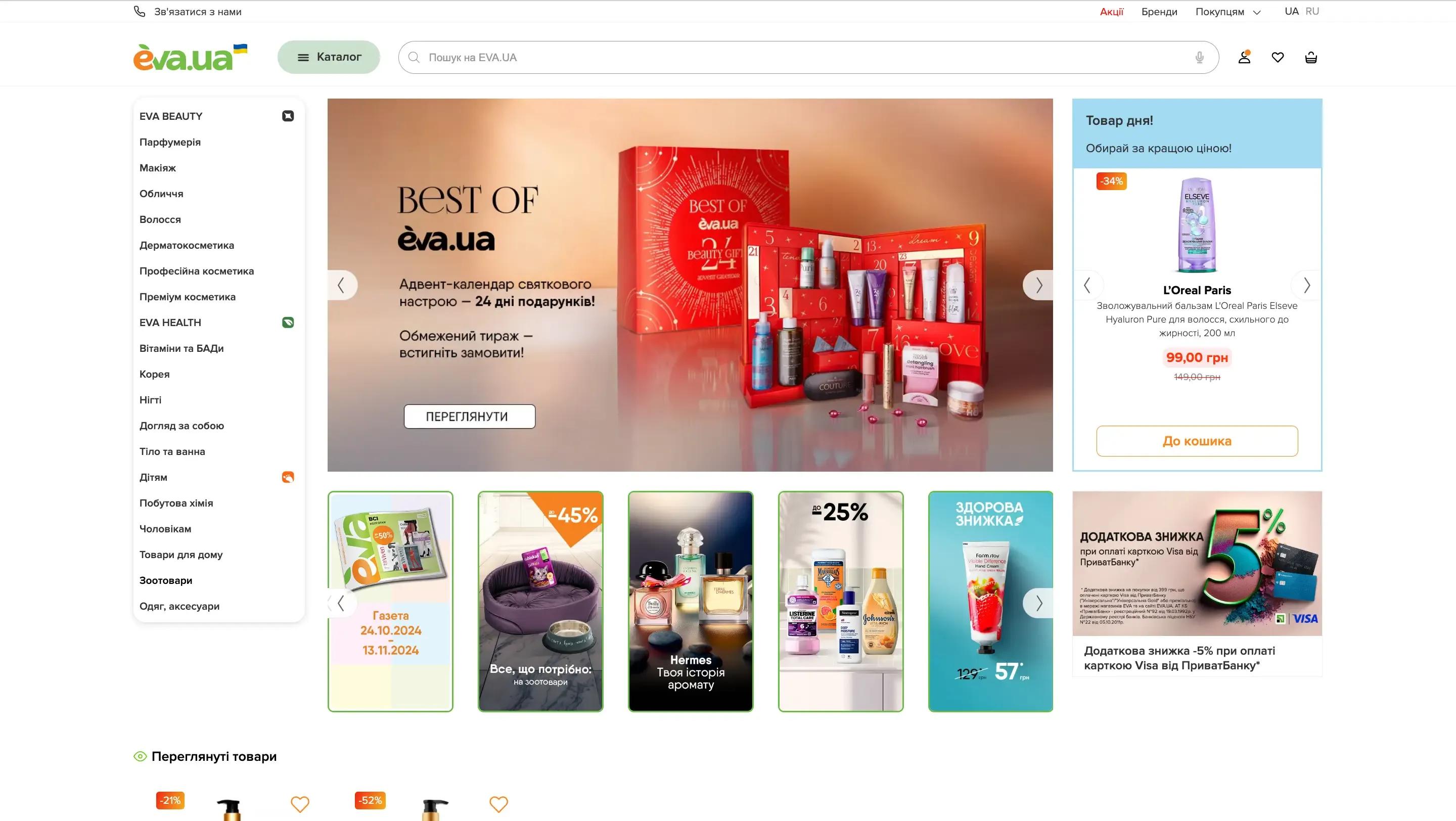
Eva.ua is the leading Ukrainian drogerie retail chain, with 1,100 offline stores, over 130,000 SKUs available online, and an impressive influx of 40,000 orders during Black Friday in 2024. Eva.ua began its eCommerce journey using a monolithic Magento system and later transitioned to a Headless PWA solution, incorporating rich custom features, marketplace capabilities, and omnichannel functionality. It’s a great example of when a business truly needs to go headless and how it can utilize its full capacity
Grasscity
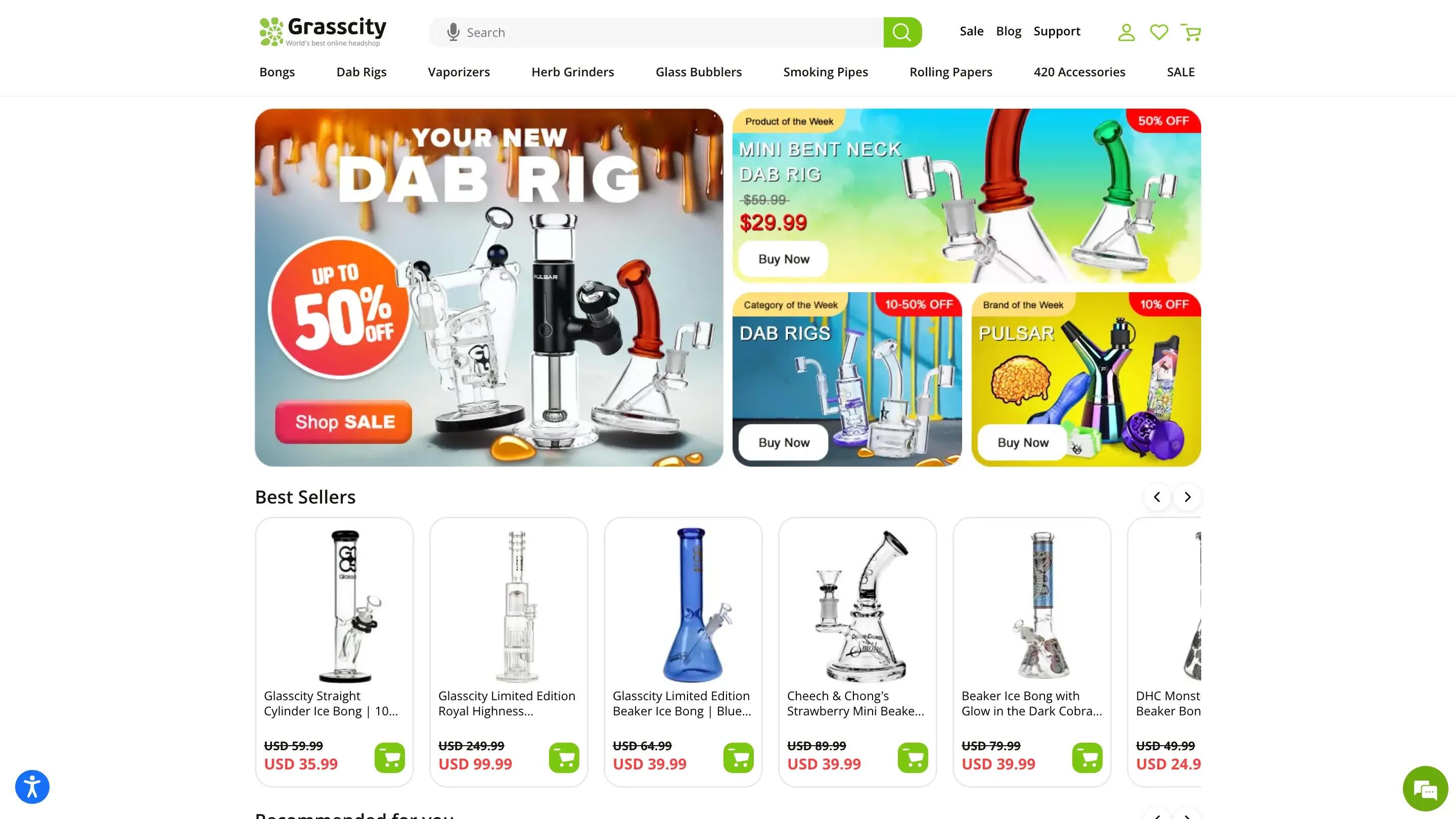
Grasscity, one of the largest online headshops globally, serves a vast community of customers with thousands of products and millions of monthly visitors. Migration to Hyvä significantly improved performance and result in visually captivating user experience.
FAQ
Most migrations run three to seven months depending on scope. A small store with standard integrations can complete in 8–12 weeks. A mid-market multi-store migration with custom logic and a Hyvä frontend typically takes 16–24 weeks. Enterprise or complex B2B migrations often run six months or more.
Cost depends on data volume, custom extensions, integration depth, and frontend choices. Small stores typically cost €15,000 to €40,000. Mid-market projects land in the €40,000 to €120,000 range. Enterprise or complex B2B migrations start at €120,000. A migration should be budgeted in the same range as building a new Magento store from scratch, because that's essentially what it is.
Yes, and we recommend it in most cases. Doing Luma → Hyvä as a separate project later means two rounds of design, frontend QA, and regression testing. Doing both during migration means you pay the disturbance cost once. Hyvä reduces Magento's frontend to roughly two CSS and JS files (from 200+ on Luma) and routinely scores above 90 on PageSpeed.
Yes, with proper planning. The SEO-critical work is the URL redirect map, metadata migration, sitemap regeneration, and Search Console handover. Most ranking drops after a migration come from gaps in that work — not from Magento 2 itself. We test redirects end-to-end before launch and monitor rankings for at least 30 days after cutover.
No. Official support for Magento 1 ended in June 2020. No security patches have been released since. Running Magento 1 in 2026 exposes your store to known vulnerabilities and can invalidate PCI DSS compliance with payment providers including Visa, potentially costing you the merchant account you need to take card payments.
Sometimes yes. If your business doesn't use Magento's strengths — multi-store, complex pricing, deep integrations, B2B features — Shopify is cheaper to run and faster to change. If you do use that complexity, Shopify will feel limiting within a year. We'll give you an honest answer on the scoping call based on your specific business.
Products, categories, customers, orders, invoices, credit memos, quotes, cart price rules, coupons, catalog rules, reviews, CMS pages, static blocks, tax and shipping configurations, payment method configurations, admin users, and store configurations. We use Magento's Data Migration Tool where it fits and custom migration scripts where it doesn't.
No. Magento 1 and Magento 2 have architecturally different codebases, so M1 extensions don't run on M2. Most popular extensions have M2 versions released by the original vendor. Others need to be replaced by M2 equivalents, and a small number need custom rebuilds. We audit every extension on your source store during scoping.
Magento Open Source is free and self-hosted — the right answer for most merchants up to mid-market. Adobe Commerce adds licensed features including native B2B, customer segmentation, content staging, advanced reporting, and official support SLAs, at an annual license fee that depends on revenue and typically starts around €20,000. Adobe Commerce Cloud bundles Commerce with managed AWS hosting. The decision comes down to whether the licensed features justify the annual cost for your business.